OL-2
The rear panel
Turn it round
Section titled “Turn it round”Press Rear panel under the faceplate to turn OL-2 round. Everything you set once lives here; press Front panel to come back.
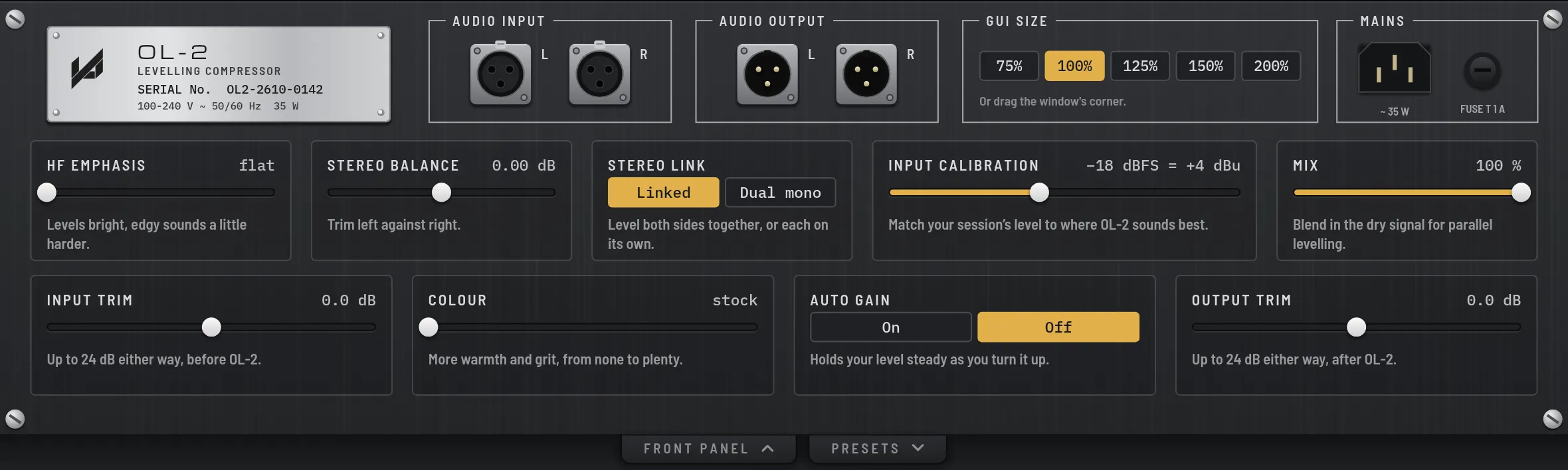
The rear panel: GUI size along the top, then the setup controls, each with a short note of what it does.
| Control | Range | What it does |
|---|---|---|
| Input Trim | −24 to +24 dB |
Level into OL-2. More in means more levelling and more colour. |
| Output Trim | −24 to +24 dB |
Level after everything else, for staging into the next plugin. |
| Colour | 0 to 100 |
More warmth and grit, from none to plenty. 0 is the clean, stock sound. |
| Auto Gain | on · off |
Holds your level steady as you turn it up. |
| Mix | 0 to 100% |
Blend in the dry signal for parallel levelling. |
| Stereo Link | linked · dual mono |
Level both sides together, or each on its own. |
| Stereo Balance | −3 to +3 dB |
Trim left against right. |
| Input Calibration | −24 to −10 dBFS |
Match your session’s level to where OL-2 sounds best. The default, −18 dBFS, suits most sessions. |
| HF Emphasis | 0 to 100 |
Levels bright, edgy sounds a little harder. 0 is flat. |
| GUI size | 75 to 200% |
The size of the OL-2 window. |