
OL-2
The front panel
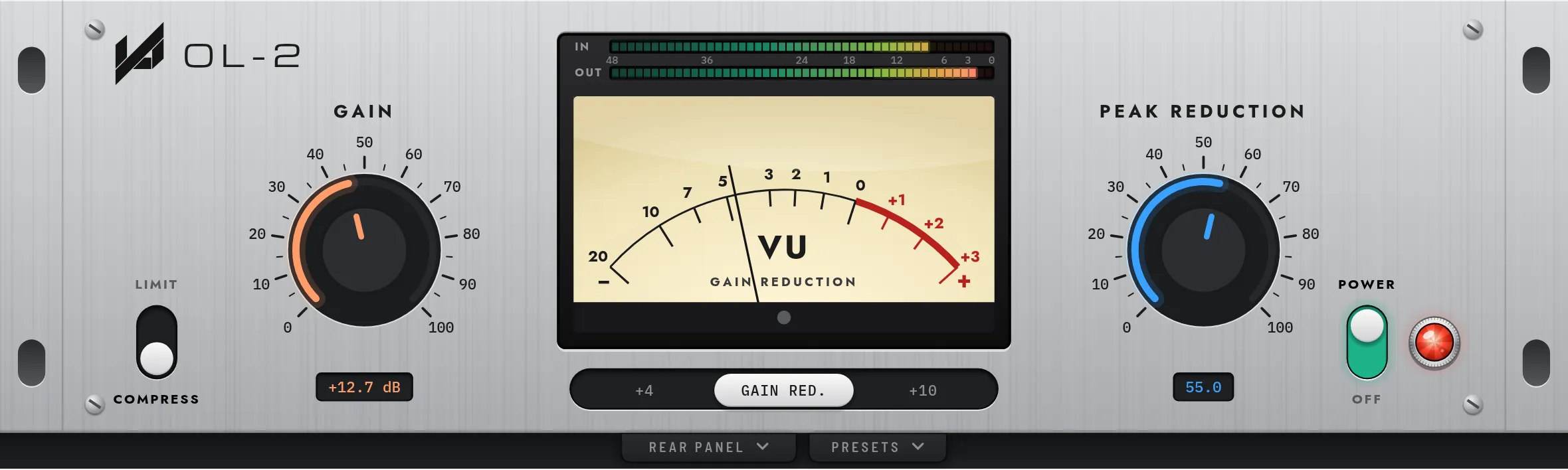
From the left: the Limit and Compress switch, Gain, the VU meter with its input and output bars, Peak Reduction, and Power.
| Control | Range | What it does |
|---|---|---|
| Peak Reduction | 0 to 100 |
How much levelling. Turn it up for more. Around halfway is where most vocals settle. |
| Gain | 0 to 100 |
Sets the output level. The readout under the knob shows the gain in dB. |
| Limit / Compress | switch |
Compress is gentle and smooth; Limit holds peaks more firmly. |
| Meter | +4 · GR · +10 |
Gain Reduction shows how far the level is coming down. +4 and +10 show the output level on two scales. Tap the switch under the meter to change it. |
| Power | switch |
Turns OL-2 on or off. The lamp beside it lights while it is on. |
Setting it up
Section titled “Setting it up”- Start with Peak Reduction. Play the loudest part and turn it up until the needle, on GR, moves a few dB on the louder phrases.
- Make up the level with Gain. Turn Gain until the output matches the level you had with OL-2 bypassed, or switch the meter to +4 and watch the output.
- Choose the response. Leave it on Compress for vocals and anything that should breathe. Flip to Limit for bass and for peaks that need holding down.