
Kerf Modulators
The panel
Open it from Extensions › Kerf Modulators: Show/hide panel. It is a real REAPER docker, so it docks, floats and remembers where you left it.
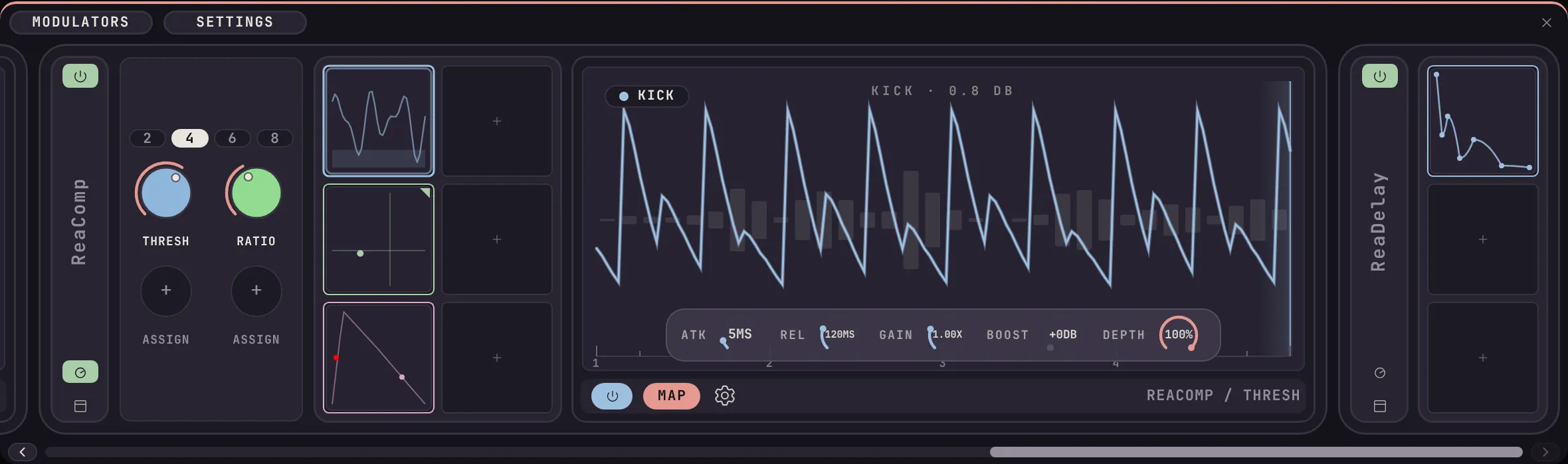
Plugin blocks on a track. Each block holds up to twelve modulator slots, three at a time, with the selected modulator’s editor beside it.
The panel follows whichever track you have selected. Pick a track with plugins on it and its blocks appear. Pick one without any and the panel empties itself, so it never shows modulators from a track you are not looking at.
An empty slot shows a plus. Click it, pick a modulator, and its editor opens beside the block. The Modulators tab holds the blocks; the Settings tab holds preferences, the colour theme and your licence.
The control bar
Section titled “The control bar”Every modulator carries the same row of controls in the same order, so it reads the same on all of them.
| Control | What it does | Right-click |
|---|---|---|
| Power | Bypasses the slot and hands every parameter back to the value it held before. It is not a pause. | |
| Map | Choose a plugin parameter to drive. | Copy, paste or delete the slot’s mappings |
| Edit | Opens the full-size editor. | |
| Settings | The range for each target, and removing a target. | |
| Randomise | Rolls new values, on Steps and the XY Pad. | |
| Block title | Click to collapse the plugin’s block. | Rename, delete the plugin, clear all slots |